
The legacy parking system has been replaced by Calven's current parking system. Click here to learn about how parking works now.
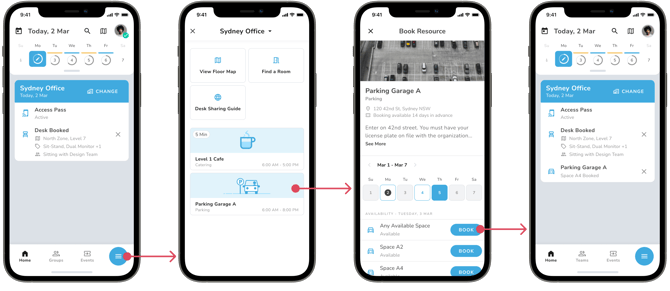
If parking is configured for your office, employees will be able to book spaces via the Calven App:
-
Press the menu button on the Calven home screen
-
Tap the parking lot you’d like to book a space in
-
Make sure you’ve got the right day selected
-
Find the space you’d like to book and press the book button.
Once you’ve booked a parking space, you’ll see a parking pass appear on the day it’s booked for:
Configure Parking
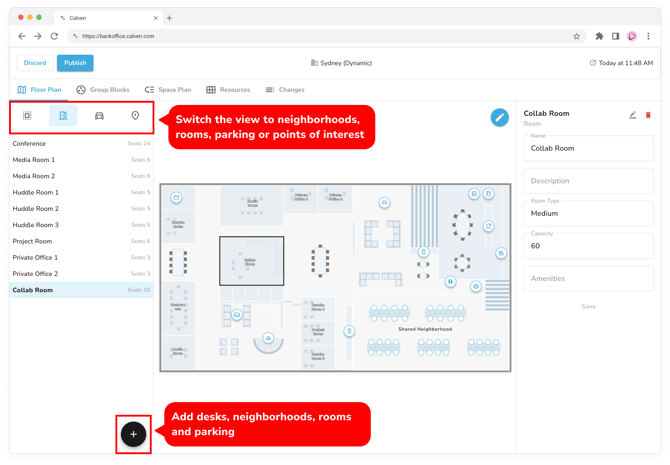
Parking spaces and parking "zones" are created very similar to desks and neighborhoods - each parking space is grouped within a zone.
When configuring a parking zone, you can customize the manual booking window (how many days in advance employees can book spaces in that zone) and the admin-booking window (how far in advance administrators can book spaces in that zone).
Note: Auto-booking is not currently possible for parking spaces
Unlike neighborhoods, parking zones cannot be linked to objects on the map. Once you’ve published parking spaces, they will be bookable by users of the Calven app. Learn more about how to book parking